Thursday, 5 May 2016

Class 50 - Making My Own Timer

Post 133

Making My Own Timer

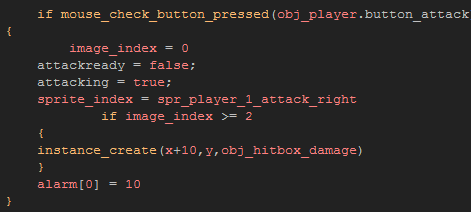
Today I started to fix my problem from last class, I spent a good two or so hours trying various ways to fix this problem using the image_index function. However it didn't seem to matter how I did it as long as I was using the Image_index function it wouldn't work. So I decided to try and find away around it, so what I did was make a normal timer that just sets off at the same time the animation starts, this should give the same effect. The problem with this is I couldn't use the alarm functions because I would have to have a different alarm for all the different variations of attack. This would make coding in the delay not worth it. So instead I created a timer that I could use on all of them at once.
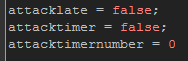

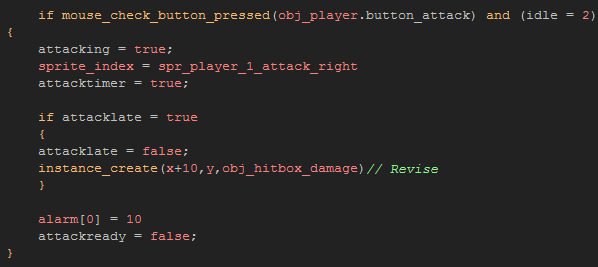
I first started with my 3 variables. "Attacklate" Tells the code when the attack should be happening, so when this is set to true the attack occurs, so obviously I want this to be set to true moments after the player clicks the attack button.
"Attacktimer" Is when the code has been told to actually start the timer, so if it is set to true that means the player is attacking.
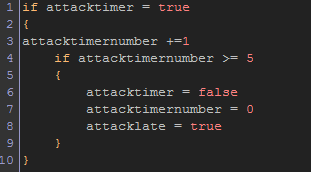
"Attacktimernumber" Is the time between when the player presses the button and when the attack should actually occur. Once this reaches 5 or greater it resets everything and sets "Attacklate'" to true, thus allowing the player to attack. Once the attack has finished "Attacklate" is set back to false and the process can repeat.
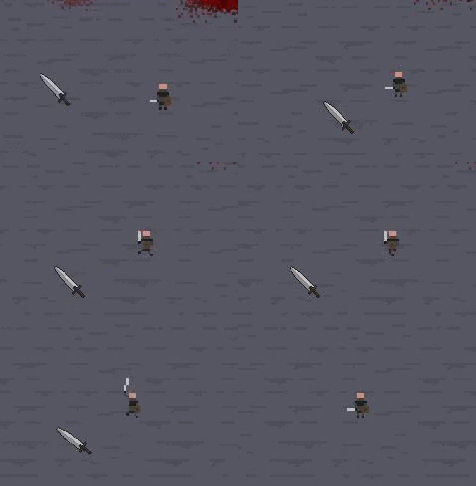

Next class I will continue to work on the code of my game and possible improve attacking in general by creating a heavy attack for the player.

Wednesday, 4 May 2016

Class 49 - Back To Coding

Post 132

Back To Coding

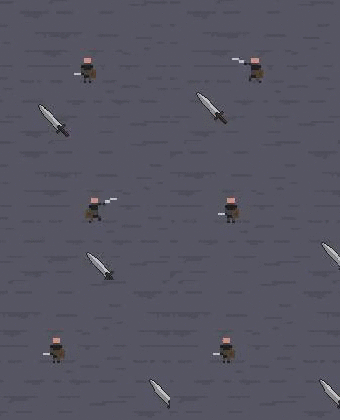
Today I decided to just jump back into my game development and get my crap together. So i started by making my attack animation look a little bit smoother by adding some extra frames.


Currently this looks and feels better, but the actually attack occurs right as the player hits the mouse button, so the enemy will take damage even when the players sword is still being swung. This doesn't make that much sense, so I am trying to make the hit box only appear after the second or third frame of the animation. However game makers Image_index can be tricky and I can't seem to make this occur easily. The detection of image frames is somewhat inaccurate depending on the speed of the animation. Currently it will not detect when it should actually make the enemy take damage because it cant detect when the animation is on image 3. This is because when its detecting the frames it has the tendency to skip frames (says the internet and various Youtube videos). The common solution to this problem is to change my equal signs to a greater than sign. So instead of it detecting a split millisecond of a single frame, all it has to do is detect one of the frames beyond it. But even after doing that the code still cannot and will not detect when the image frame has gone beyond 3. Currently there are only 5 frames in the animation, so I am unsure whether its because of the low amount of frames that causes this to be incredibly difficult or if its just because of a stupid inconvenience inside Game Maker itself.
Tomorrow I will continue to work on this issue and hopefully fix it to work exactly how I want it to work.


Wednesday, 27 April 2016

Class 43 - Games In Unity

Post 126

Games In Unity

So this post I will be talking about more of my Unity research. Right now I am looking into what exactly Unity can do as a 3D engine. I am still unsure if I actually want to start working in Unity, so that's why I think it is necessary for me to look at things made in unity.
So currently I am browsing the internet finding games that have been made in the newest version of the Unity engine (Unity 5).
Interestingly enough I stumbled on a game I am familiar with, and have played in the past without knowing it was using the Unity Engine. This game is called Rust, and is basically a survival game that lives off a very strong sense of PvP (Player Vs Player). The game is currently in an Early Access state and has bi-weekly updates. But the best part about me stumbling onto this game is that they have a blog. Not just any blog though, they have a development blog closely resembling what we independents students have been making on our own. Now obviously their blog doesn't really tell you what they learned and focuses on what they have made and added. But it provides a great deal of material to read and learn from.
Overall I think it was a good find, and it is defiantly something I would like to read just out of curiosity.

It also shows me and nice example of where a game can go in just 1 year of development. Because last time I played this game it looked like this.


But just in one year the developers took this game and expanded on it, and took it through all the versions of Unity on the way. And they ended up making something that is the same, yet entirely different. So now this game looks like this.


The new version not only looks better it is also just better. And as far as I can tell they added tons of new weapons, items, and animals.
The game also holds servers with 200 people and has gigantic maps all randomly generated. So unity definitely does not limit your capability to make a big game.
Next Class I am still unsure what I will do. But possibly look into more things made with Unity and or learn more about the development of video games by trying to find more Devblogs or continuing to read the Rust Devblog.

Unity 5 Showcase Video